
Are you thinking about upgrading your home lighting with Ikea smart bulbs but wonder if they work with Google Home? You’re not alone.
Connecting smart devices can sometimes feel confusing, and you want to be sure your investment will fit seamlessly into your smart home setup. What if you could control your lights with just your voice through Google Home? Imagine the convenience and comfort that brings.
Keep reading to find out exactly how Ikea smart bulbs perform with Google Home and whether they’re the right choice for your smart living space.
Compatibility Check
Ikea smart bulbs are popular for their affordability and ease of use. Many users want to know if these bulbs work with Google Home.
This guide looks at how well Ikea smart bulbs connect and function with Google Home devices.
Supported Ikea Smart Bulbs
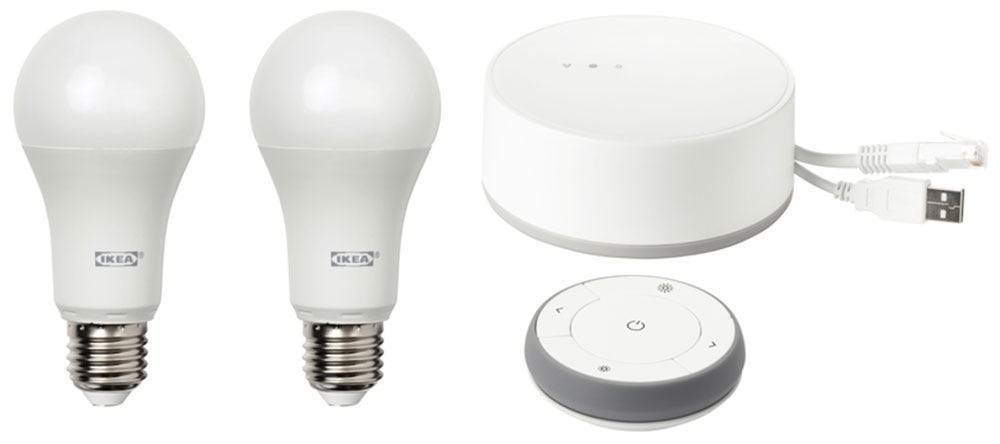
Ikea offers several smart bulbs under the Tradfri line. Not all models have the same features or compatibility.
- Tradfri LED bulb E26/E27
- Tradfri LED bulb GU10
- Tradfri LED bulb E14
- Other newer versions with updated firmware
Most of these bulbs support connection through Ikea’s Tradfri Gateway or Zigbee hubs.
Google Home Integration Requirements
Google Home works best when smart devices connect through a compatible hub or app. For Ikea bulbs, this usually means using the Tradfri Gateway.
You need the following to connect Ikea bulbs to Google Home:
- Tradfri Gateway connected to your Wi-Fi
- Ikea Home smart app for setup
- Google Home app for voice control
Without the gateway, direct connection is limited or not supported.
Pairing Process With Google Home
After setting up the Tradfri Gateway and bulbs in the Ikea app, you can link your Ikea account to Google Home.
Google Home will discover the bulbs via the gateway, allowing voice control and automation.
- Open Google Home app
- Add device and select Ikea Tradfri
- Log into your Ikea account
- Allow Google to access Tradfri devices
- Control bulbs using voice or app
Limitations And Compatibility Issues
Some Ikea bulbs may face delays or limited features when used with Google Home. Advanced options might require the Ikea app.
Firmware updates and app versions affect compatibility. Check for updates if you have issues.
- Some bulbs may not support color changes via Google Home
- Automation rules might be limited
- Direct Bluetooth connection to Google Home is not available
Credit: medium.com
Setting Up Ikea Smart Bulbs
Ikea smart bulbs offer smart lighting that works with Google Home. Setting them up is simple and quick. This guide helps you connect your bulbs to Google Home for voice control.
You will need some basic equipment and follow a few easy steps. After setup, you can control lights with your voice or phone.
Required Equipment
Before starting, gather all the devices you need. Having everything ready makes the process smooth.
- Ikea smart bulbs (TRÅDFRI series)
- Ikea TRÅDFRI Gateway or compatible hub
- Google Home device (Google Nest Mini, Hub, or similar)
- Smartphone or tablet with Google Home app installed
- Stable Wi-Fi network
Installation Process
First, install the Ikea smart bulbs in your light fixtures. Turn on the power to the bulbs.
Next, use the Ikea TRÅDFRI Gateway to connect the bulbs to your home network. Follow the instructions in the Ikea app to add bulbs.
- Plug in the TRÅDFRI Gateway and connect it to your router
- Download and open the Ikea Home Smart app
- Follow the app steps to pair your bulbs with the gateway
- Once paired, open the Google Home app
- Add the Ikea TRÅDFRI service in Google Home to link accounts
- Discover devices in Google Home and assign bulbs to rooms
After setup, you can use voice commands with Google Assistant to control your Ikea smart bulbs.
Integrating With Google Home
Ikea smart bulbs can work with Google Home devices. This allows you to control your lights with voice commands.
You can turn lights on or off, dim them, or change colors using Google Assistant.
Connecting Ikea Bulbs To Google Home
First, make sure your Ikea smart bulbs are set up in the Ikea Home Smart app. Then open the Google Home app on your phone.
In the Google Home app, add a new device and select the Ikea Home Smart service. Follow the instructions to link your Ikea account.
- Open Google Home app
- Tap “Add” then “Set up device”
- Choose “Works with Google”
- Search for “Ikea Home Smart”
- Log in with your Ikea account
- Select your bulbs to link
Troubleshooting Common Issues
If Google Home does not find your Ikea bulbs, check if both devices are on the same Wi-Fi network. Also, ensure the bulbs are powered on.
Sometimes, unlinking and relinking the Ikea account in the Google Home app can fix problems. Restarting the Google Home device may help too.
- Check Wi-Fi connection for all devices
- Make sure bulbs are turned on
- Update Ikea Home Smart and Google Home apps
- Unlink and relink Ikea account in Google Home
- Restart Google Home device

Credit: www.reddit.com
Features And Benefits
Ikea smart bulbs offer easy control and energy savings. They work well with Google Home devices for a smart home setup.
Using Ikea smart bulbs with Google Home lets you control lighting with your voice. You can also save energy while enjoying smart features.
Voice Control Capabilities
You can control Ikea smart bulbs using simple voice commands through Google Home. This adds convenience and ease to your daily routines.
- Turn lights on or off without touching a switch
- Adjust brightness levels using voice commands
- Change colors for mood lighting if your bulb supports it
- Set schedules or timers by speaking to Google Home
- Control multiple bulbs in different rooms with one command
Energy Efficiency
Ikea smart bulbs are designed to use less power than regular bulbs. This helps reduce your electricity bill and lowers environmental impact.
| Feature | Benefit |
| LED Technology | Uses up to 85% less energy than traditional bulbs |
| Adjustable Brightness | Save energy by using only the light you need |
| Scheduled Lighting | Automatically turns off lights to avoid waste |
| Long Lifespan | Reduces bulb replacements and waste |
Comparing With Other Smart Bulbs
Ikea smart bulbs can work with Google Home to control lighting easily. Many smart bulbs offer this feature, but their performance and price vary.
Let’s compare Ikea smart bulbs with other popular smart bulbs on price, value, performance, and reliability.
Price And Value
Ikea smart bulbs are usually cheaper than many other brands. This makes them a good choice for budget buyers.
Their value comes from solid features at a low cost. Other smart bulbs may cost more but offer extra functions.
- Ikea bulbs are affordable and easy to install.
- Brands like Philips Hue cost more but have more color options.
- Some bulbs include advanced features like music sync or sensors.
Performance And Reliability
Ikea smart bulbs work well with Google Home for basic tasks like turning on and off. They have good response times.
Other smart bulbs may offer better brightness and more consistent connections. Some can handle complex routines better.
- Ikea bulbs provide stable performance for simple uses.
- Philips Hue bulbs often have stronger signals and more brightness levels.
- Some brands have apps that offer more control and settings.
User Experience And Reviews
Many users want to know if Ikea smart bulbs work well with Google Home. This connection allows easy voice control and automation.
People often look at reviews and expert opinions to decide if these bulbs fit their smart home setup.
Customer Feedback
Users generally report that Ikea smart bulbs connect easily to Google Home. They like controlling lights with voice commands.
- Easy setup with Google Home app
- Good response time to voice commands
- Affordable compared to other smart bulbs
- Some users mention occasional connectivity drops
- Color and brightness controls work well
Expert Opinions
Experts say Ikea bulbs offer a solid basic smart lighting experience with Google Home. They fit well for simple home setups.
| Feature | Rating | Notes |
| Compatibility | 4/5 | Works smoothly with Google Home |
| Ease of Use | 5/5 | Simple app and voice control |
| Reliability | 3.5/5 | Occasional connection issues reported |
| Price | 5/5 | Very affordable option |
Future Updates And Trends
Ikea smart bulbs have gained popularity for their affordability and ease of use. As smart home technology grows, these bulbs will likely see updates that improve their compatibility with Google Home.
Understanding upcoming features and technology trends can help users prepare for better smart lighting experiences in their homes.
Upcoming Features
Ikea plans to add new features that enhance control and customization of smart bulbs through Google Home. These updates may include:
- Voice commands for setting moods and scenes
- Improved scheduling options
- Energy usage monitoring within Google Home app
- Integration with more smart home devices
- Faster response times for bulb control
Technological Advancements
Advances in technology will make Ikea smart bulbs more efficient and user-friendly. Some key trends include better connectivity, longer bulb lifespan, and smarter software.
| Technology | Benefit |
| Bluetooth Mesh | Stronger connection with Google Home |
| AI Integration | Adaptive lighting based on user habits |
| Energy Efficient LEDs | Lower power consumption |
| Firmware Updates | Continuous feature improvements |

Credit: www.reddit.com
Frequently Asked Questions
Do Ikea Smart Bulbs Support Google Home Integration?
Yes, Ikea smart bulbs support Google Home integration. You can control them using voice commands via Google Assistant. This allows easy management of lighting through compatible smart devices.
How To Connect Ikea Smart Bulbs With Google Home?
To connect, open the Google Home app, tap “Add,” and choose “Set up device. ” Then select “Works with Google” and link your Ikea account. Follow the prompts to sync your smart bulbs with Google Home.
Can I Use Voice Commands For Ikea Bulbs With Google Home?
Yes, voice commands work with Ikea smart bulbs via Google Home. You can turn bulbs on/off, dim lights, or change colors using simple voice instructions through Google Assistant.
Are Ikea Smart Bulbs Compatible With All Google Home Devices?
Ikea smart bulbs are compatible with most Google Home devices. This includes Google Nest Mini, Google Home Max, and other Google Assistant-enabled speakers or displays for seamless control.
Conclusion
Ikea smart bulbs connect well with Google Home devices. You can control lights using simple voice commands. Setting them up takes only a few minutes. They respond quickly and work reliably with Google Assistant. This makes managing your home lighting easy and convenient.
Small glitches may happen but are rare. Overall, Ikea smart bulbs offer good compatibility with Google Home. A simple solution for smart lighting at home.